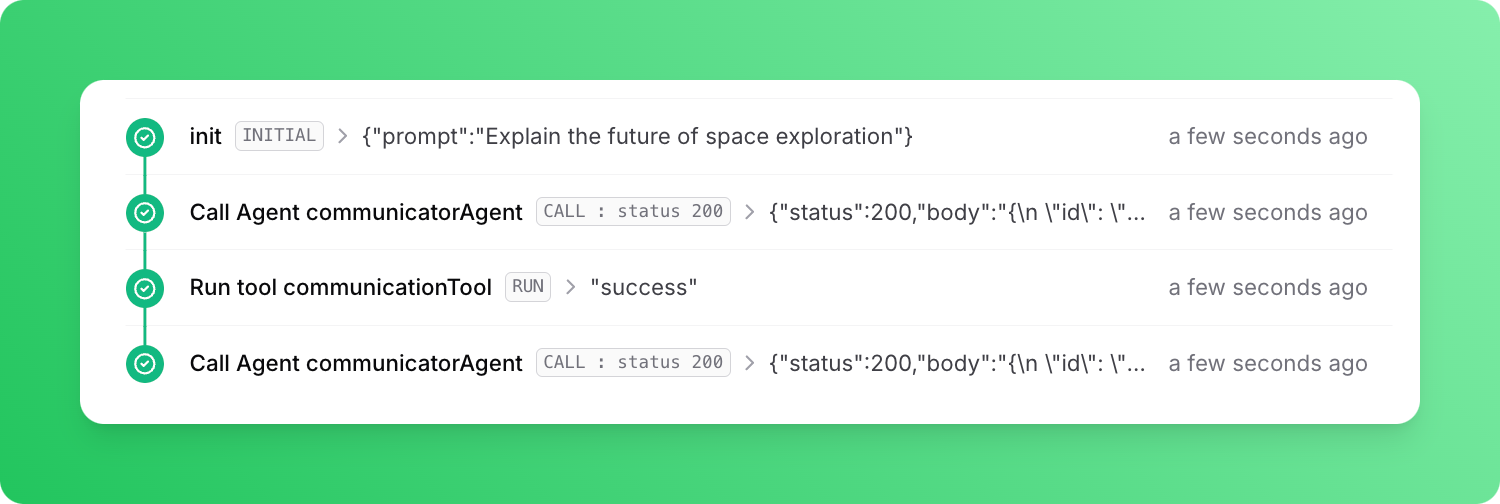
In this guide, we will be using Next.js. If you’re working with a different supported framework, you can find instructions on how to define a workflow endpoint in the quickstarts.If you’re new to Upstash Workflow, it’s a good idea to start by exploring the Local Development documentation. This guide will help you set up and use Upstash Workflow in a local environment.
Since you are using @upstash/workflow, set QSTASH_DEV=true in your .env.local file and the SDK will download, start, and connect to a local QStash development server automatically — no tokens or signing keys to copy over. Add your OPENAI_API_KEY alongside it:
.env.local
QSTASH_DEV=trueOPENAI_API_KEY=<OPENAI_API_KEY>
For manual setup, custom ports, and the registerQStashDev() helper for Next.js edge routes, see the Development Server guide.
Next, we will define the endpoint to run the agent.
app/workflow/route.ts
import { z } from "zod";import { tool } from "ai";import { serve } from "@upstash/workflow/nextjs";import { agentWorkflow } from "@upstash/workflow-agents";export const { POST } = serve<{ prompt: string }>(async (context) => { const prompt = context.requestPayload.prompt const agents = agentWorkflow(context) const model = agents.openai('gpt-3.5-turbo') const communicatorAgent = agents.agent({ model, name: 'communicatorAgent', maxSteps: 2, tools: { communicationTool: tool({ description: 'A tool for informing the caller about your inner thoughts', parameters: z.object({ message: z.string() }), execute: async ({ message }) => { console.log("Inner thought:", message) return "success" } }) }, background: 'Answer questions directed towards you.' + ' You have access to a tool to share your inner thoughts' + ' with the caller. Utilize this tool at least once before' + ' answering the prompt. In your inner thougts, briefly' + ' explain what you will talk about and why. Keep your' + ' answers brief.', }) const task = agents.task({ agent: communicatorAgent, prompt }) const { text } = await task.run() console.log("Final response:", text);})
import { Client } from "@upstash/workflow";const client = new Client({ baseUrl: process.env.QSTASH_URL, token: process.env.QSTASH_TOKEN!,})const workflowRunId = await client.trigger({ url: "http://127.0.0.1:3000/workflow", body: { prompt: "Explain the future of space exploration" }})console.log(workflowRunId);
If you are using a local tunnel, replace the url above (http://127.0.0.1:3000)
with the public URL.
In the console where you run the Next.js app, you should see logs like this:
Inner thought: I will discuss the future of spaceexploration and the potential advancements intechnology and missions.Final response: The future of space explorationholds exciting possibilities with advancementsin technology, potential manned missions toMars, increased commercial space travel,and exploration of distant celestialbodies.
If you run the same endpoint using a local tunnel, you can also see how Upstash Workflow runs the agent in steps:Each tool invocation and LLM call is a seperate step. Our agent first made a call to OpenAI to decide whether to use a tool or reply right away. OpenAI responded with a request to use the tool communicationTool. Tool was executed and OpenAI was called with the result of the tool. OpenAI then responded with the final response.